
NoteBox App
Music Rating App Concept & Design
Case Study
This project followed a process similar to NaNa Media, requiring me to create a brand identity and mobile app concept entirely from scratch. This time, however, I wanted to explore a completely different area — moving away from e-commerce and into something closer to my heart: music.
Music has always been one of my biggest passions. I listen to it constantly, while working, studying, and even sleeping. One of my favorite features from Spotify is the Sound Capsule, which shows detailed listening statistics like top artists, songs, and total minutes played. I wanted to take that idea further and design an app that dives deeper into music engagement.
At the same time, I’ve always admired how Letterboxd lets users rate and review movies and shows, creating a community around shared interests. I wanted to bring that same experience to music.
And so, NoteBox was born. A platform that combines the analytical side of Spotify with the social and review-based approach of Letterboxd, all wrapped in a gamified experience that celebrates music discovery.
Disciplines
- UX Research
- UI Design
- Graphic Design
- Branding
Responsibilities
- Research & Ideation
- Wireframing & prototyping
- Brand creation & logo design
- Final visual design & mockups
Research & Brainstorming
Problem
There is currently no dedicated platform that allows users to review or rate music, whether it’s artists, albums, or singles. Access to listening statistics, such as top artists, total minutes, and frequently played songs, is also limited within existing streaming platforms.
Moreover, there’s no way for listeners to interact or compete with friends, comparing who listened to the most music, discovered the most new artists, or spent the most time listening each month.
Goal
Create a music-based social hub where users can share reviews, explore stats, and interact with their friends. Through gamified challenges and achievements, users can complete missions and earn badges displayed on their profiles, bringing a playful and competitive layer to music engagement.
Audience
The target audience includes music enthusiasts who enjoy discovering, rating, and discussing music across genres. They are active users of streaming services and social platforms, seeking a space that combines community, personalization, and creativity.
Competitor Analysis
While some apps, such as Last.fm, provide music statistics, these features remain limited in scope and lack community interaction. Other platforms focus on social aspects but don’t integrate listening data in meaningful ways.
NoteBox fills this gap by combining analytics, reviews, and social connectivity, offering an experience that no existing app fully delivers.
Insights & Opportunity
Because this niche remains largely unexplored, NoteBox has the potential to stand out as a unique addition to the market.
Future integrations could include partnerships with major streaming services like Spotify and Apple Music, allowing users to connect their accounts for more accurate and personalized data directly pulled from their listening history.
Project Overview
App Description
NoteBox is a gamified music-rating and discovery app that blends social interaction, personal analytics, and community-driven exploration. The app allows users to track their listening habits, marking albums as listened or queued, giving ratings from 0.5 to 5, and writing detailed reviews.
Users can follow friends and creators to see personalized feeds filled with reviews, lists, and favorites, making music discovery a shared experience. Through smart recommendation systems, NoteBox suggests new albums and artists based on user ratings and the listening patterns of friends, creating a dynamic and evolving discovery process.
To let users express their musical identity, profiles feature a Top 9 section for pinning favorite albums and custom lists or shelves organized by theme, genre, or year. The Release Watchlist keeps users up to date by notifying them when their followed artists release new music.
Other features include a social feed highlighting trending albums and editor picks, tagged reviews with mood and genre information, and smart recommendations powered by collaborative filtering. NoteBox also supports account syncing with Spotify, Apple Music, and Last.fm, ensuring users have accurate and up-to-date stats. Light gamification elements, such as badges and streaks, encourage engagement, while privacy controls give users flexibility over how they share their reviews and lists.
Brand Concept
Before approaching the visual identity, I defined the app’s features to better understand its tone and purpose. Since NoteBox blends gamified functionality with social interaction, the branding needed to feel fun, dynamic, and youthful.
The name “NoteBox” references the Note Block item from Minecraft, a subtle nod to both creativity and music. To reflect this spirit, the logo uses Druzhba Retro, a playful and nostalgic typeface that complements the app’s energetic personality.
Color Palette
With NoteBox, I wanted to explore a more expressive and vibrant color direction. Purple has always been one of my favorite colors, so I built the palette around it and its complementary tones, red and blue.
After several tests, I settled on a combination that felt lively yet balanced:
- Cyan Blue (#00C2CB)
- Vivid Red (#FF4D6D)
- Bright Purple (Bright Purple (#8C52FF))
These colors together convey creativity, excitement, and individuality, aligning with the brand’s mission to make music discovery feel as playful as it is personal.
The colors Dark Purple (#241945) and Off-White (#f2efeb) were chosen as the secondary colors.
Gamified Features
To make the experience more engaging, NoteBox integrates light gamification inspired by mobile learning platforms. These mechanics reward exploration, consistency, and community participation — turning music discovery into an interactive and social challenge.
- Themed Challenges: Dynamic missions like “Review 10 R&B albums”, “Listen to 5 debut records”, or “Complete the Summer Hits badge” encourage users to explore different genres and broaden their taste.
- Ranked Listening: A monthly leaderboard showcases which users in each friend group logged the most listening minutes, adding a playful sense of competition.
- Badge System: Users earn collectible badges for reaching milestones such as “First 50 Reviews”, “Cross-Genre Explorer”, or “Five Star Critic”, which appear on their profile.
- Streak Rewards: Daily and weekly streaks motivate users to stay active, post reviews, and interact regularly with their friends’ activity.
- Community Events: Limited-time review festivals and seasonal challenges create bursts of activity and foster collaboration between users.
Branding
Colors
Typography
IBM Plex Sans
IBM Plex Sans Bold
Icons







Logo Variations
.png)
.png)
.png)
User Goals
Users want a dedicated space where they can express their opinions about music without getting lost in the noise of generic social platforms. They aim to document their listening history and observe how their taste evolves over time, while discovering new and trustworthy recommendations from people they actually follow. At its core, NoteBox fulfills the desire to belong to a community organized around shared taste, all while helping users stay updated on new releases from their favorite artists.
User Persona
Ashley Graham
Ashley is an energetic professional who spends most of her day surrounded by music. She often exchanges album recommendations with her friends and enjoys discovering new artists online. One day, after several friends urged her to listen to a newly released album, she wanted to rate it and share her thoughts, but realized there wasn’t a dedicated platform for that. Social media felt too cluttered, and streaming apps didn’t offer meaningful review features. That’s when she realized there was a gap for a space built just for music lovers like her.
Pain Points
- No centralized platform to review and share opinions about music.
- Streaming services limit interaction, with no real discussion.
- Social media conversations about music are quickly forgotten.
Needs
- A community-driven app dedicated to music reviews and discovery.
- A personal space to track her listening history and evolving taste.
- Easy ways to find credible recommendations from people she trusts.
NoteBox addresses Ashley’s needs by providing a dedicated social hub for music discussion, allowing her to rate and review albums, follow friends, and discover new artists in an interactive and rewarding way.
User Journey - Posting and Sharing a Review
Step 1 – Find the Album
Ashley opens NoteBox, taps the Search bar, types the album name, and selects it from results. (If it’s on her Feed via friends’ activity, she taps it there.)
Step 2 – Rate & Review
On the Album Page, she taps Rate/Review (or click on the rating icon) → selects 4.5★, writes a short review, and adds tags: Genre, Mood, and Standout Track.
Step 3 – Choose Visibility & Post
She sets Visibility to Friends (or Public), then taps Post Review. The review can now appear on her friends’ feeds, and a notification is sent (if enabled).
Step 4 – Tag & share to friends
On the posted review, she taps Share/Tag, selects her friend group, @mentions a couple of friends, and adds the review to her Summer Hits list. Friends receive in-app notifications.
Stage 5 – Follow-up & Engage
Comments and reactions roll in. Ashley earns the First Review badge, pins the album to her Top 9, and adds the artist to her Release Watchlist to get notified about future drops.
Final Designs
Home Page
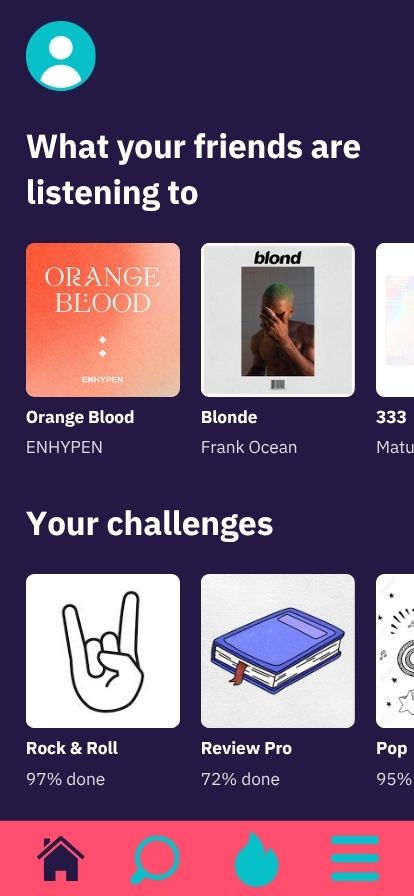
The Home Page was designed to immediately draw users into the NoteBox experience by blending social interaction and progress tracking.
The first section, “What your friends are listening to,” highlights real-time activity across the user’s network, displaying which albums or artists their friends are currently enjoying, complete with friend tags for easy recognition. This feature encourages engagement and discovery through shared listening habits.
The second section, “Your Challenges,” focuses on gamified engagement. It displays the user’s active challenges and progress in percentage form, while also suggesting new challenges based on their listening history and behavioral data. Whether users are exploring a new genre or completing a themed badge, this area keeps them motivated to interact with the platform consistently.
.jpg)
User Page
The User Page gives each user the freedom to personalize their profile and showcase their music journey within the app.
At the top, users can view key stats such as their total number of reviews, followers, and following count, giving a quick overview of their community presence.
Beneath that, the Top 9 section displays the user’s favorite albums, complete with album titles and artist names — a personalized snapshot of their current taste. This page also features the Monthly Listening Stats area, where users can explore how many minutes they’ve listened to each month. Selecting the current month provides live, up-to-date data synced with their listening history.
At the bottom, users can view their earned badges and ongoing or completed challenges, giving them a clear visual of their achievements and progress. This section reinforces NoteBox’s gamified identity by celebrating consistency and engagement.
.jpg)
Album Page
The Album Page serves as a central hub for exploring and reviewing a selected album, combining critical details, community insights, and personalized discovery.
At the top, users can access essential album information such as the cover art, artist name, release date, and rating. They can also read or write their own album reviews directly on this page, making it the core space for sharing opinions and experiences.
A social feature highlights whether friends or followers have reviewed or saved the album, working similarly to how users can see mutual connections on social media. This creates an interactive layer that encourages conversation and shared discovery.
Finally, the Related Albums section expands user engagement by recommending not only other works from the same artist but also albums from similar genres or styles, helping users dive deeper into their musical interests.
.jpg)
Friends/Challenges Page
The Friends & Challenges Page is where the social and gamified aspects of NoteBox truly come to life.
At the top, the “Monthly Rank” section displays a leaderboard showcasing each friend’s total listening minutes for the current month. The user with the highest count sits at the top, turning everyday listening into friendly competition. During private sessions or friend groups, top-ranked users can earn badges or experience points, reinforcing NoteBox’s gaming-inspired reward system.
Below, the “Ongoing Challenges” section highlights current themed events, whether monthly or seasonal, inspired by trends like top artists, genres, or special events. These challenges rotate periodically, allowing users to complete them at their own pace before they expire. Once a challenge ends, its badges become exclusive collectibles, adding a sense of rarity and achievement to active participation.